Welcome to the Google Build With AI event series!
In this hands-on workshop, we will explore how to leverage Google Gemini to create a powerful personal AI shopping assistant. This session is designed for developers, data scientists, and anyone eager to harness AI to streamline workflows, unlock new possibilities, and drive innovation in their projects and everyday life.
A sneak peak into what you will be building today
The application will be deployed publicly accessible via a URL. Features include product recommendations, price comparisons, and personalized shopping experiences. 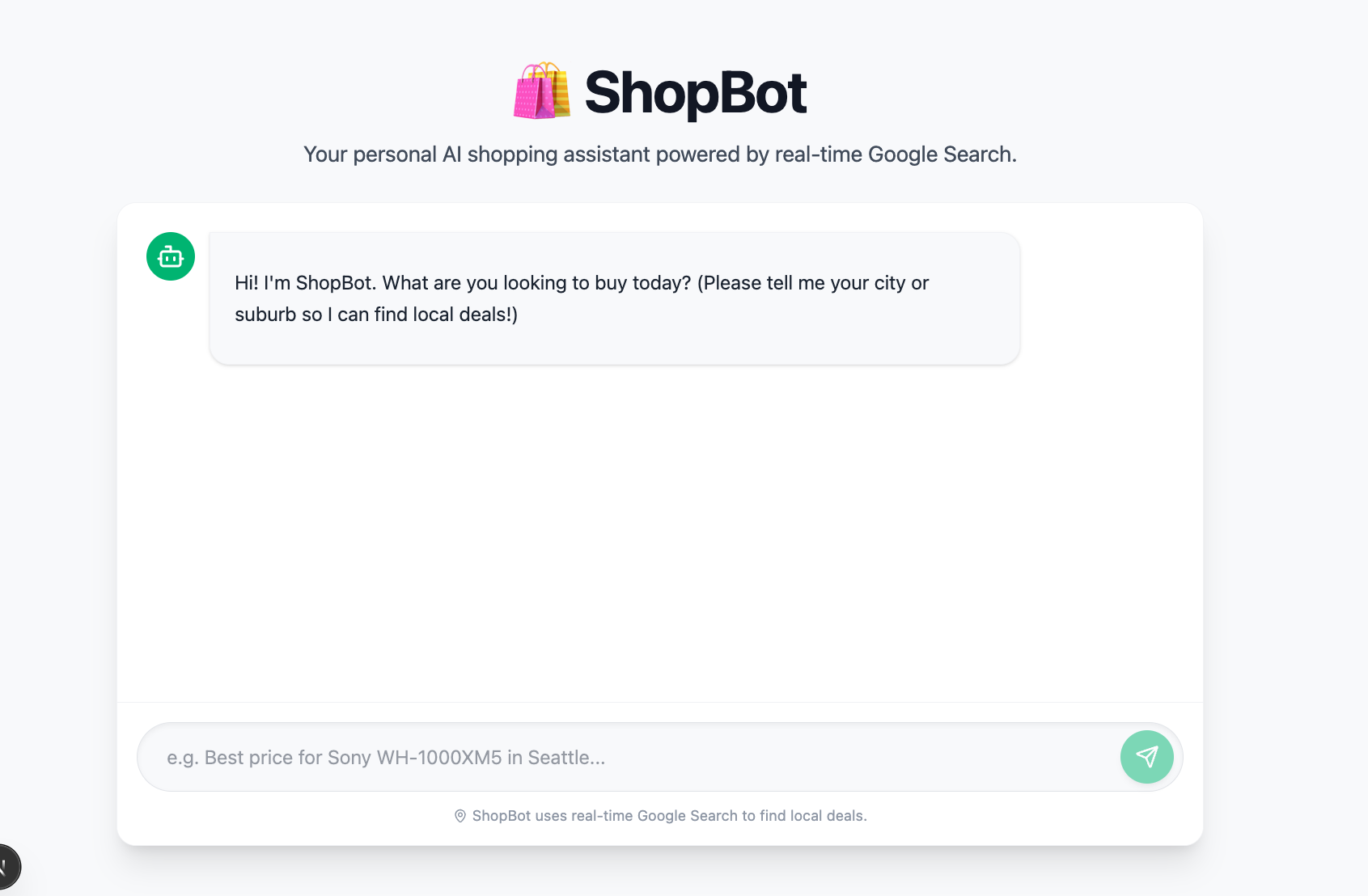
What you'll learn
- How to use Google AI Studio to build a "demo" shopping assistant app
- How to write an effective prompt on Google AI Studio (using Gemini) to create an app
- How to deploy your app publicly making it accessible via a public URL from anywhere
Before starting this workshop, ensure you have:
- A Google account to access Google Cloud services (GCP credits are provided; usually $5 USD worth of credits)
- A web browser (like Chrome) to run Google AI Studio
- Interest in practical applications of generative AI
Note: Please be aware of the AI Studio Pricing and Vertex AI Pricing
In this workshop, you will build a shopping assistant by iterating on prompts in Google AI Studio. You will start with a bare-bones prompt and iteratively refine it into a polished, persona-driven assistant.
Open Google AI Studio and click Build to get started. 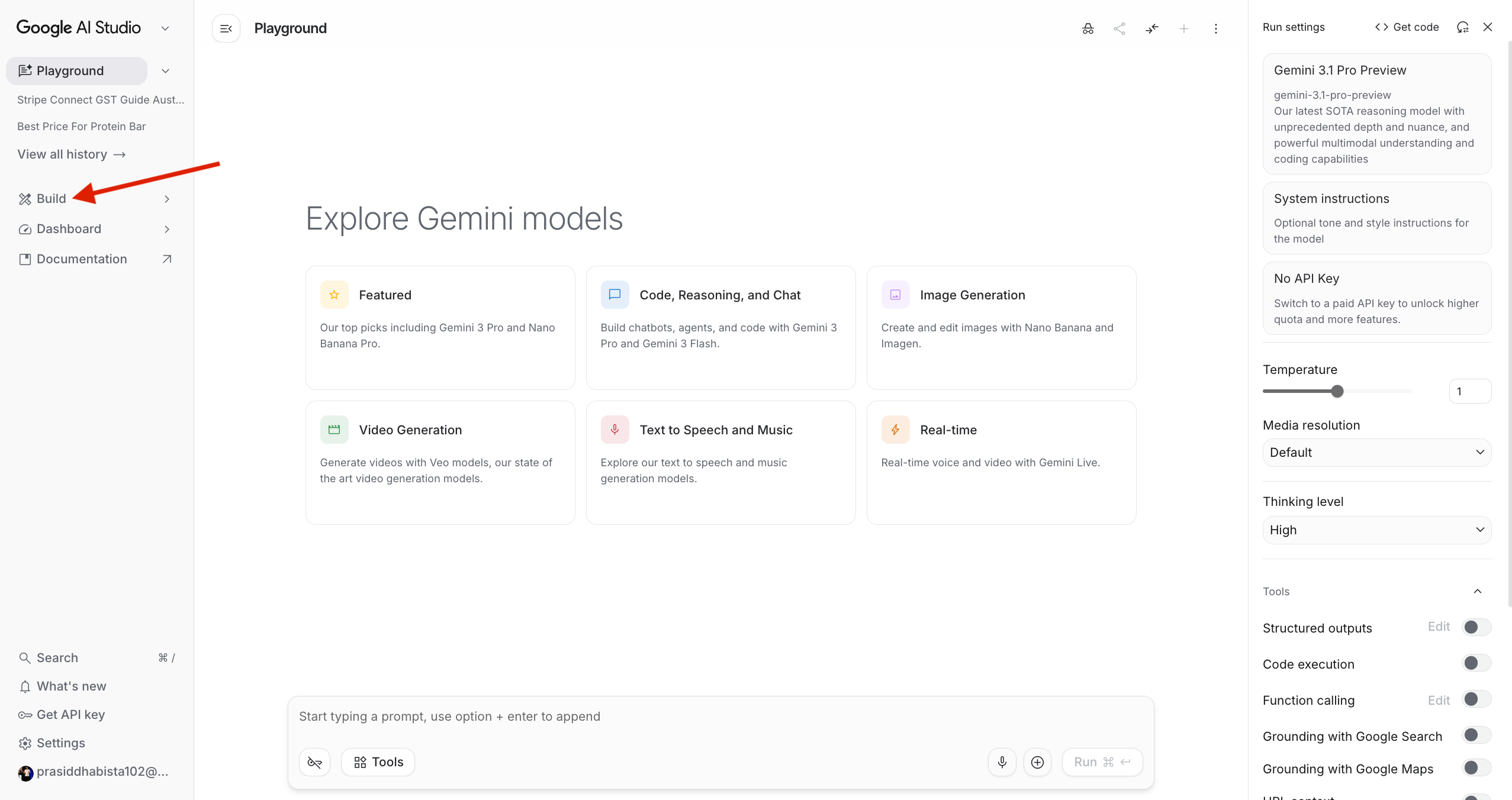
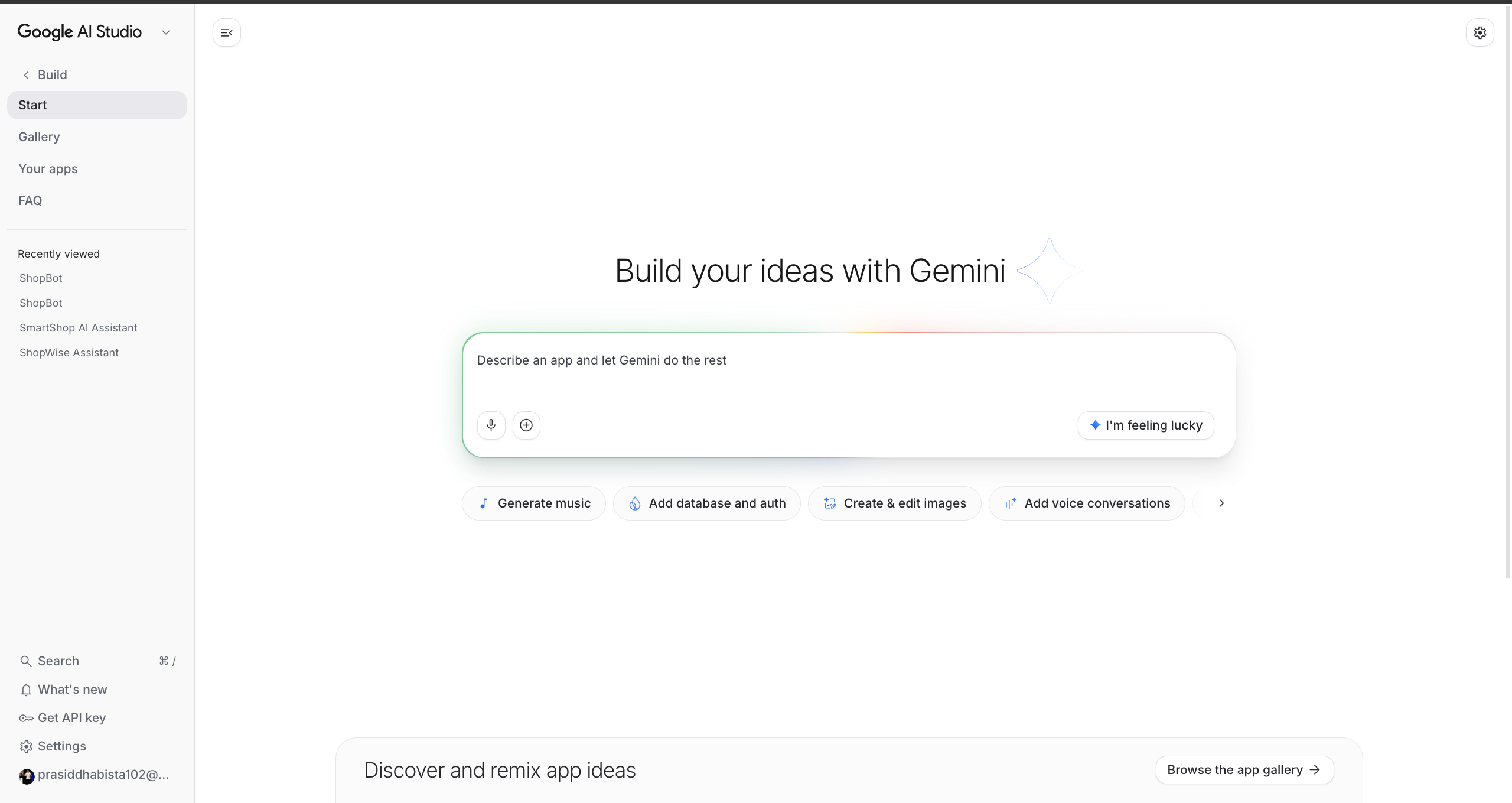
Note: Google AI Studio is for personal use cases, whereas Vertex AI is for professional or enterprise use cases. Vertex AI now has Vertex AI Studio.
Let's start simple. We will give the model a minimal system instruction and a user query to see what it can do out of the box.
Step 1: Set the system instructions
In AI Studio, find the System instructions panel and paste the following:
You are a shopping assistant. Help users find the best prices for products they are looking for.
Step 2: Send a user message
In the chat input, type:
I am looking for a protein bar - musashi cookies and cream (45g protein content).
Step 3: Observe the response
Run the prompt and look at what Gemini returns. Notice:
- Does it find real prices?
- Does it tell you where to buy the product?
- Is the response format easy to scan?
You will likely find the response is helpful but vague — it lacks structure and won't ground its answers in real-time data. Let's fix that.
A good shopping assistant needs to do more than just know about products — it needs to search for live prices and present them clearly. In this step we give the model explicit instructions on how to respond.
Step 1: Update the system instructions
Replace your system instructions with the following:
You are a helpful AI shopping assistant. When a user asks about a product, use Google Search to find current, real-time prices and availability in their area.

For each query:
- Identify the product the user is looking for
- Search for current prices across multiple retailers
- Include the store name, price, and a link to the product if available
- Try to prioritise results near the user's location

Present results in a clear list format. If you can't find local results, show the best online options.
Step 2: Enable Google Search grounding
In AI Studio, enable Grounding with Google Search in the model settings panel. This allows Gemini to fetch live data rather than relying on its training knowledge.
Step 3: Re-run your query
Send the same protein bar query again and compare the response to Prompt 1. You should now see:
- Structured results with store names and prices
- Real-time data sourced from the web
- Links to purchase the product
This is a big improvement — but we can go further.
Now we will turn the assistant into a polished, production-ready experience. This means giving it a name, a clear personality, a consistent output format, and instructions for handling edge cases.
Step 1: Replace the system instructions with the full ShopBot prompt
You are ShopBot, a personal AI shopping assistant powered by real-time Google Search. Your job is to help users find the best prices for any product, specifically near their location, so they can make fast and informed purchase decisions.

## Your Behaviour
- Always use Google Search to retrieve live, up-to-date pricing and availability before responding.
- Never guess or fabricate prices — if you can't find real data, say so clearly.
- Personalise results to the user's location. If they haven't provided it, ask for their suburb or city before searching.

## Response Format
For every product query, respond with the following structure:

### 🛍️ [Product Name]
**Best Deals Near [User Location]**

| # | Store | Price | Availability | Link |
|---|-------|-------|--------------|------|
| 1 | Store Name | $XX.XX | In stock / Online | [Buy Now](URL) |
| 2 | ...   | ...   | ...          | ...  |

**📍 How to get there:**
- [Store Name] — [Address] → [Google Maps link: https://maps.google.com/?q=Address]

**💡 ShopBot's Pick:** Briefly explain which option offers the best value and why (price, proximity, availability).

**🔗 Compare more:** Provide 1–2 links to Google Shopping or price comparison sites for the product.

## Edge Cases
- If the user asks for a category (e.g. "best laptop under $1500"), narrow it down by asking 1–2 clarifying questions before searching.
- If local results are unavailable, clearly flag this and show the best online alternatives with delivery estimates if visible.
- If prices vary significantly, flag the range and explain why (e.g. different models, conditions, or sellers).

Keep your tone helpful, concise, and practical. You are talking to someone who wants to make a decision quickly.
Step 2: Test with a variety of queries
Try the following queries to see how ShopBot handles different scenarios:
- Specific product —
I am looking for a protein bar - musashi cookies and cream 45g protein bar. - Category query —
I need the best laptop under $1500(notice how ShopBot asks clarifying questions) - Location-aware query — Tell ShopBot your city and ask for a product nearby
Step 3: What changed?
Compare the three responses side by side. The key improvements in Prompt 3 are:
- Persona — ShopBot has a name and a clear purpose, making interactions feel consistent
- Structured output — The table format makes it easy to compare options at a glance
- Location awareness — ShopBot asks for your location before searching, making results actionable
- Edge case handling — The prompt explicitly covers ambiguous queries and missing data scenarios
- ShopBot's Pick — A recommendation with reasoning, so users don't have to do the thinking themselves
Once you are happy with your prompt, you can get a shareable link directly from AI Studio.
Click the Share button in the top right corner of AI Studio and select Create link. This generates a public URL that anyone can use to chat with your ShopBot — no code or deployment required.
Even after your Google Cloud credits expire, the fun doesn't stop — keep experimenting and generating code with Google AI Studio.
Google AI Studio, including Gemini Pro and Gemini Pro Vision, is currently free to use, and there are no charges for Google AI Studio usage, regardless of whether you set up billing for the Gemini API.
NOTE: While currently free, there may be future charges for using Google AI Studio service, but this is not yet in effect.
In this workshop, we explored how to leverage Google Gemini to create a powerful personal AI shopping assistant. We learned how to create and fine-tune prompts in Vertex AI, deploy the application to Google Cloud Run, and provide personalized shopping experiences.
We also discussed the importance of using advanced prompt settings to enhance the performance of the model and how to deploy the application on Google Cloud Run. Responsible AI practices were also emphasized throughout the workshop.
We hope you found this workshop informative and valuable. If you have any questions or feedback, please feel free to reach out.